

Server rack rail width is not one number printed on a datasheet. It is the result of subtracting the chassis width from the rack's hole spacing and dividing by two, and the answer decides how thick a rail you can use. This article walks through that arithmetic, shows how to measure the chassis correctly, and gives a table of chassis width against side clearance and rail class.
The three widths in the equation
Three widths decide whether a rail fits side to side. Two are fixed by the rack standard; one belongs to your chassis.
- 465.1 mm (18.312 in): the center-to-center distance between the mounting holes on the left and right vertical rails of a 19-inch rack, fixed by EIA-310. Rail brackets reference this line, and the space between the posts behind the front flange is where the rail's outer member lives.
- 450.85 mm (17.75 in): the minimum clear opening between the vertical rails. The chassis body has to pass through it, which caps chassis width at a little under 450 mm.
- Chassis width across the rail mounting surfaces, which for most 19-inch servers is somewhere between about 430 and 448 mm.
The other rack dimensions, including the 482.6 mm panel width and the external cabinet width, do not enter the calculation. For the full set, see server rack dimensions explained and the 19-inch rack standard.
The arithmetic: side clearance per side
The space available to each rail is:
(hole spacing 465.1 mm minus chassis width) divided by 2
- A 448 mm chassis leaves about 8.5 mm per side.
- A 440 mm chassis leaves about 12.5 mm per side.
- A 430 mm chassis leaves about 17.5 mm per side.
That number, roughly 8 to 17 mm, is the side clearance that the entire rail stack must fit in: the outer member, the middle member on a three-section rail, the inner member, the ball retainers, and the bracket that hooks or bolts to the post. It also has to leave enough running clearance for the members to slide without rubbing the chassis skin or the post.
The real figure is slightly smaller than the arithmetic suggests, because the post's own material sits near the hole line and the chassis is never perfectly centered. Treat the calculated value as a ceiling.
King Slide lists "space between rack and chassis" first among its five rail selection points, according to its website, and for good reason. It is the dimension most often left out of an RFQ and the one least possible to fix afterward. Length can be adjusted with a bracket; thickness cannot.
Rail thickness classes and where they fit
Rail makers describe thickness as the stacked width of the closed rail, sometimes called the rail width or the profile width. The industry falls into three broad bands. Figures are typical, not a specification for any one model.
- Ultra-slim rails, under about 10 mm stacked. Thin-gauge members, often two-section or a compact three-section ball-bearing design, aimed at chassis close to the 448 mm limit. Ratings are moderate, and travel is sometimes shorter because the members have less overlap area to work with.
- Standard rails, roughly 10 to 13 mm. The most common class for 1U to 4U servers. Three-section ball-bearing rails with full extension and mid-range dynamic ratings, and most friction rails, sit here. Fits chassis of about 440 mm and narrower.
- Heavy-duty rails, above about 13 mm. Thicker steel, taller sections, more ball rows, sometimes a doubled outer member. Built for GPU, storage and liquid-cooled chassis where the dynamic load is far beyond a normal 2U server. They need a chassis designed with the side gap to accept them, typically around 430 to 435 mm wide.
Thickness and rating are linked. A rail carries load through the overlap of its members and the section depth of its steel, so a thicker rail has more of both. That is why a heavy-duty rail such as the MS-BBR-180, with a nominal capacity of up to 180 kg per pair for AI and GPU servers, is not a drop-in for a chassis that was designed around a slim rail. See heavy-duty rails for GPU and AI servers for the load side of this trade.
How to measure chassis width correctly
Most fit problems on the width axis come from measuring the wrong surface. The rail mounts to the chassis side wall, so that is the surface to measure.
- Measure outside to outside across the two side walls where the rail's inner member will mount. Use calipers or a steel rule at two or three points along the length, because stamped side walls are rarely perfectly parallel; record the largest value.
- Do not measure across the front flange, mounting ears or bezel. A 482.6 mm ear width tells you nothing about the body.
- Note anything that protrudes from the side wall in the rail zone: standoffs, T-pins, keyhole studs, latch buttons, riveted brackets. A rail with a stab-in inner member sits over these, but they still take up width. See T-pin and keyhole mounting explained.
- If the chassis side has a recessed channel for the rail, measure both the width at the bottom of the channel and the channel width; the rail must fit both.
- Measure the rack too: the clear distance between the inside faces of the posts at the height where the rail sits. Hole spacing is standard, but the post section behind the flange varies by manufacturer.
A drawing beats a tape measure, but the five numbers above are enough for a rail engineer to work from. See which chassis dimensions matter for rail fit.
Front flange width vs body width
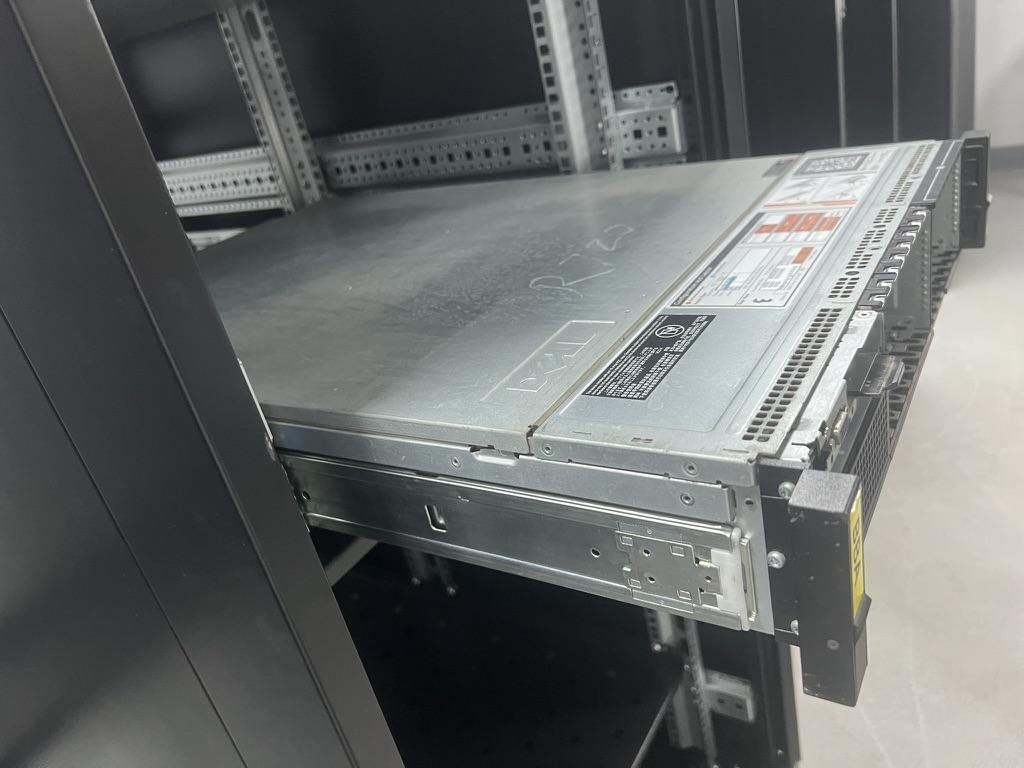
A rack-mount chassis has two widths, and a rail cares about only one.
- Flange (ear) width is the full 19-inch dimension, nominally 482.6 mm. The ears sit in front of the posts and locate the chassis in the rack.
- Body width is the sheet-metal enclosure between the ears, the 430 to 448 mm figure. This is what passes through the 450.85 mm opening and what the rails run alongside.
The ears matter for one thing only: the rail's front bracket must not interfere with the ear when the chassis is pushed home, or the chassis will stand proud of the rack by the bracket thickness.
When the rail is too thick or too thin
Getting the width wrong fails in two directions.
Too thick for the gap: binding. The rail is forced into a gap smaller than its stacked width. Symptoms are a chassis that has to be pushed home, that scrapes the post or side panel, or that will not extend smoothly. A rail that is squeezed sideways loses its running clearance, the ball retainers are loaded in a direction they are not designed for, and the rail wears fast. In the worst case the chassis fits at the front and jams at the rear because the posts are not parallel.
Too thin for the load: deflection. A slim rail chosen for the side gap but under-rated for the chassis weight will sag at full extension, the inner member can lift off the ball path, and the locking mechanism may not engage squarely. This is the failure mode behind most "rails feel loose" complaints. Check the dynamic rating at full extension, not just the static figure; see server rail load capacity explained.
When both constraints bite at once, the fix is usually a rail whose profile height and steel gauge are adjusted to carry the load within the available width. That is a customization question; thickness is among the adjustments MetrixSlide makes without a tooling fee.
Chassis width vs side clearance vs rail class
Generic reference. The clearance column is the arithmetic value; the actual usable gap is a little less.
| Chassis body width | Side clearance per side (calculated) | Rail class that usually fits | Notes |
|---|---|---|---|
| 448 mm | about 8.5 mm | Ultra-slim only | Common on compact 1U chassis; verify the post section leaves the full gap |
| 445 mm | about 10 mm | Ultra-slim, thin standard | Borderline for standard three-section ball-bearing rails |
| 440 mm | about 12.5 mm | Standard | Most 1U to 2U rails, ball-bearing or friction, fit here |
| 437 mm | about 14 mm | Standard, some heavy-duty | Typical of many 2U to 4U server chassis |
| 434 mm | about 15.5 mm | Standard, heavy-duty | Room for thicker outer members and ball retainers |
| 430 mm | about 17.5 mm | Heavy-duty | Design target for GPU and storage chassis carrying high dynamic loads |
Two cautions. First, a rail class label is not a thickness guarantee; ask for the stacked width on the drawing. Second, the table assumes the rail runs along a flat side wall. A chassis with a recessed rail channel may accept a thicker rail than its body width suggests, because part of the rail sits inside the channel.
FAQ
What is the standard server rack rail width?
There is no single standard. The rack fixes the hole spacing at 465.1 mm and the minimum opening at 450.85 mm; the rail's own stacked width must fit in the gap left beside your chassis, which is typically 8 to 17 mm per side. Rail makers build ultra-slim, standard and heavy-duty rails to suit different gaps.
How wide is a server chassis?
Most 19-inch server chassis are between about 430 and 448 mm across the body, measured outside to outside across the side walls. The front ears or flange are wider, nominally 482.6 mm, but they are not the width that matters for rail fit.
How do I know if my rails are too thick for my rack?
Measure the chassis body width, subtract it from 465.1 mm and halve the result. Compare that with the stacked width on the rail drawing. If the rail is within about a millimeter of the calculated gap, or the chassis has to be forced home, the rail is too thick for that chassis in that rack.
Do all 19-inch racks have the same distance between the rails?
Side to side, yes: the hole centers are 465.1 mm apart on any rack built to EIA-310, so a chassis and rail that fit one rack fit another on the width axis. What varies is the post section behind the flange and the front-to-rear post distance, which is why you should still measure the specific rack.
Can a rail be made thinner to fit my chassis?
Within limits. Thickness is one of the customizations MetrixSlide does without a tooling fee, alongside bracket changes, hole patterns and length. A thinner rail has less section to carry load, so the request has to be checked against the chassis weight; send the chassis width, weight and the rack details and the fitment proposal will say what is possible.
Next step
If you have a chassis width and a chassis weight, you already have the two numbers that decide rail thickness. Send them, with the rack hole type and post distance, through the quote page and a mechanical engineer will return a fitment proposal within 24 hours. For a thin, tool-less option to try first, order a sample pair of the MS-FMR-1U2U-115 friction-mount rail; standard models ship from one pair in 3 business days.
King Slide is a trademark of King Slide Works Co., Ltd. Dell and PowerEdge are trademarks of Dell Inc. HPE and ProLiant are trademarks of Hewlett Packard Enterprise. Other brand names are the property of their respective owners and are used only to describe compatibility or comparison. MetrixSlide is not affiliated with, endorsed by, or sponsored by these companies.